High Intent Lead Capture
High Intent Lead Capture is ZipTier's intelligent lead detection system that identifies purchase-ready prospects during AI assistant conversations and captures their contact information at the right moment — without the friction of upfront email forms.
Instead of requiring visitors to provide their email before starting a conversation, ZipTier monitors the conversation for buying signals and only asks for contact details when the visitor is showing genuine purchase intent. This results in higher-quality leads and a better visitor experience.
How It Works
The High Intent Lead Capture system works in four stages:
- Conversation Monitoring
As a visitor chats with your AI assistant, ZipTier analyzes the conversation in real time for purchase intent signals.
- Intent Detection
When the system detects strong buying signals, it identifies the visitor as a high-intent prospect and triggers a contextual email capture prompt within the conversation.
- Email Capture
The AI assistant naturally asks the visitor for their contact email at a relevant point in the conversation — not as a gate, but as a helpful follow-up offer. This non-intrusive approach leads to significantly higher capture rates.
- Lead Delivery
Once the email is captured, ZipTier waits approximately 10 minutes (to allow the conversation to conclude) and then delivers the lead via email alert and, if configured, pushes it directly to your HubSpot CRM.
Intent Signal Detection
ZipTier evaluates purchase intent by looking for five specific signals during conversations. The system applies strict standards — it only flags a signal when there is clear, explicit evidence in the visitor's words, not from polite interest or curiosity alone.
| Signal | What It Detects | Triggers When |
|---|---|---|
| Purchase | Clear buying intent or requests for next-step commercial actions | Visitor asks to get started, requests a contract, or indicates readiness to move forward. Pricing questions or feature comparisons alone do not trigger this signal. |
| Timing | Concrete timeframes, deadlines, or urgency to implement | Visitor references a specific rollout window, evaluation period, or deadline (e.g., "We need this before our event next month"). Vague interest like "maybe later" does not qualify. |
| Authority | Explicit decision-making power or approval responsibility | Visitor states they make, influence, or approve purchasing decisions. Simply mentioning their job title or department is not enough. |
| Need | Specific pain points, business problems, or gaps with current solutions | Visitor describes a concrete problem they are facing (e.g., "Our bounce rate is too high", "We lose leads after webinars"). General product questions or feature inquiries do not qualify. |
| Budget | Budget references, spend limits, or financial approval constraints | Visitor mentions an actual budget amount, affordability concern, or need for financial approval. Pricing questions by themselves do not trigger this signal. |
When multiple signals are detected in a single conversation, the confidence level increases and the system is more likely to trigger the email capture prompt. The detection is deliberately conservative — it filters out casual browsers and curiosity-driven questions to ensure you only receive alerts for genuinely purchase-ready prospects.
Why Quick Follow-Up Matters
Research consistently shows that the speed of follow-up is one of the strongest predictors of converting a lead into a customer. Prospects who are actively researching solutions and showing purchase intent have a narrow window of engagement — the longer you wait, the more likely they are to move on to a competitor or lose momentum.
ZipTier is designed to help you act fast. From the moment a high-intent prospect is detected during a conversation, the system captures their contact information and delivers a lead alert to your inbox within approximately 10 minutes. If you've connected HubSpot, the lead is simultaneously pushed to your CRM so your sales team can begin follow-up immediately — no manual data entry, no delays.
Lead Alert Emails
When a high-intent lead is captured, ZipTier sends an email alert to the account owner within approximately 10 minutes. The email includes:
- A summary of the conversation and key topics discussed
- The detected intent signals (Purchase, Timing, Authority, Need, Budget)
- The campaign and AI assistant that captured the lead
- A direct link to view the prospect's contact details in the High Intent Leads page
Viewing Captured Leads
All captured high-intent leads are available in the High Intent Leads page. From the lead alert email, click the link to go directly to the prospect's details, where you can:
- View a summary of the conversation and key topics discussed
- See the detected intent signals
- Review the prospect's contact information
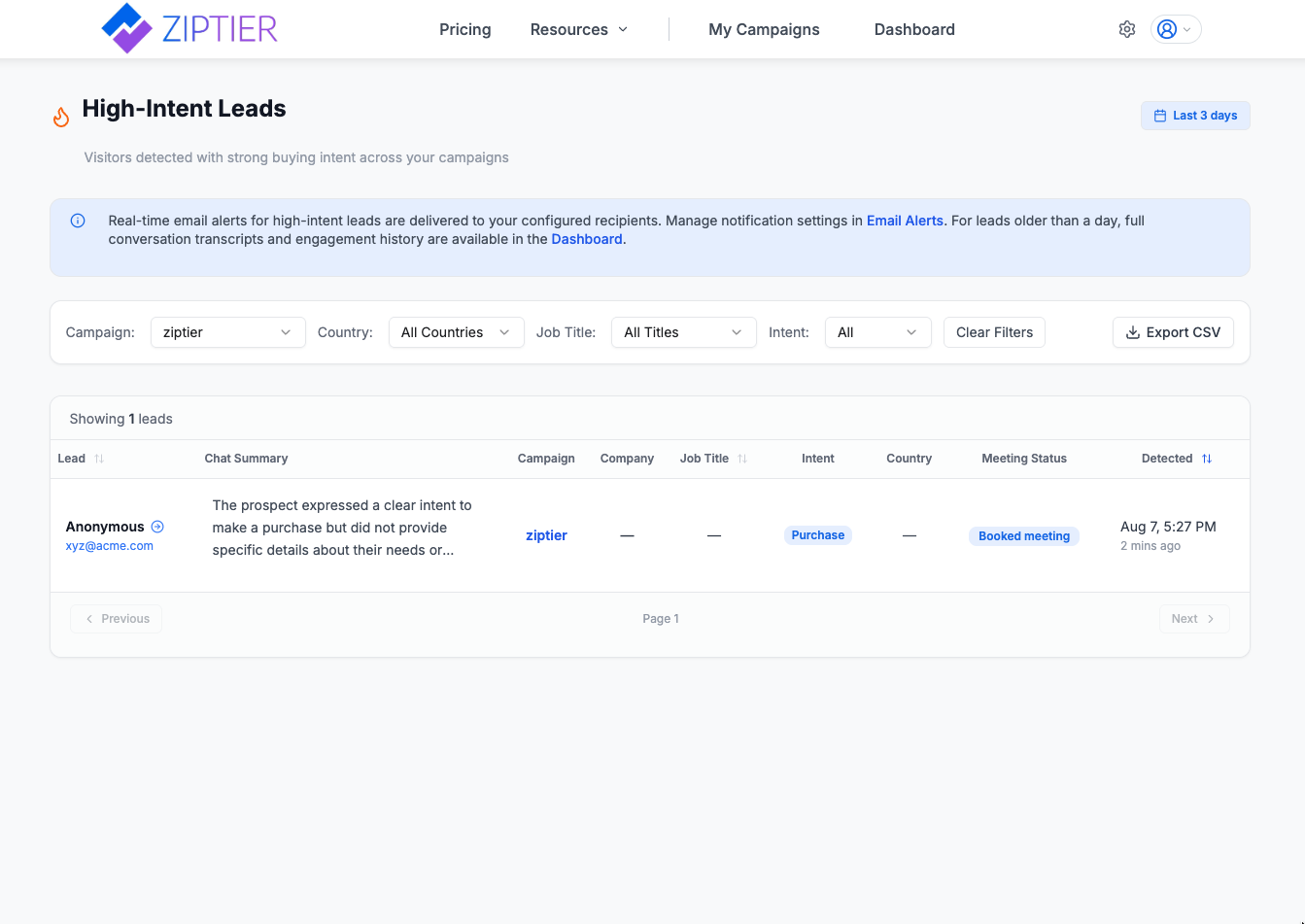
The High-Intent Leads page — visitors detected with strong buying intent across your campaigns.
HubSpot CRM Integration
You can connect your HubSpot CRM to automatically push high-intent leads as contacts. This eliminates manual data entry and ensures your sales team can follow up immediately from within HubSpot.
For a complete guide on connecting HubSpot, configuring field mappings, testing the integration, and monitoring sync activity, see the HubSpot CRM Integration documentation.
Best Practices
- Don't ask for email upfront — Let the AI assistant build rapport first. High Intent Lead Capture works best when visitors feel comfortable sharing information naturally.
- Review leads promptly — High-intent leads have a short window of opportunity. Aim to follow up within 1 hour of receiving the alert.
- Connect your CRM — Connect HubSpot to eliminate manual data entry and enable your sales team to act immediately. See the HubSpot CRM Integration guide.
- Customize your AI assistant — A well-configured assistant with relevant content produces more meaningful conversations, leading to higher-quality intent signals.
- Upload comprehensive content — The more detailed your knowledge base, the deeper conversations visitors will have, increasing the chance of surfacing purchase intent signals.
Frequently Asked Questions
Why wait 10 minutes before sending the alert?
The 10-minute delay allows the conversation to reach a natural conclusion. This means the conversation summary in the alert captures the full context, giving your sales team the most complete picture of the prospect's needs and intent.
What happens if the visitor doesn't provide their email?
If the visitor declines to share their email, the conversation continues normally. The interaction is still recorded in your campaign analytics, but no lead alert is triggered since there's no contact information to follow up on.
Can I adjust the intent detection sensitivity?
The intent detection system is pre-tuned for optimal performance. It uses strict qualification standards and requires clear, explicit evidence of purchase intent — not just curiosity or polite interest. This ensures you only receive alerts for genuinely high-intent prospects.
Does this replace the upfront email collection form?
You can use both approaches. Some campaigns may benefit from collecting email upfront (e.g., gated content), while others work better with the High Intent Lead Capture approach (e.g., product exploration, pricing inquiries). You configure this per campaign in the campaign setup wizard.