Knowledge Base Gaps
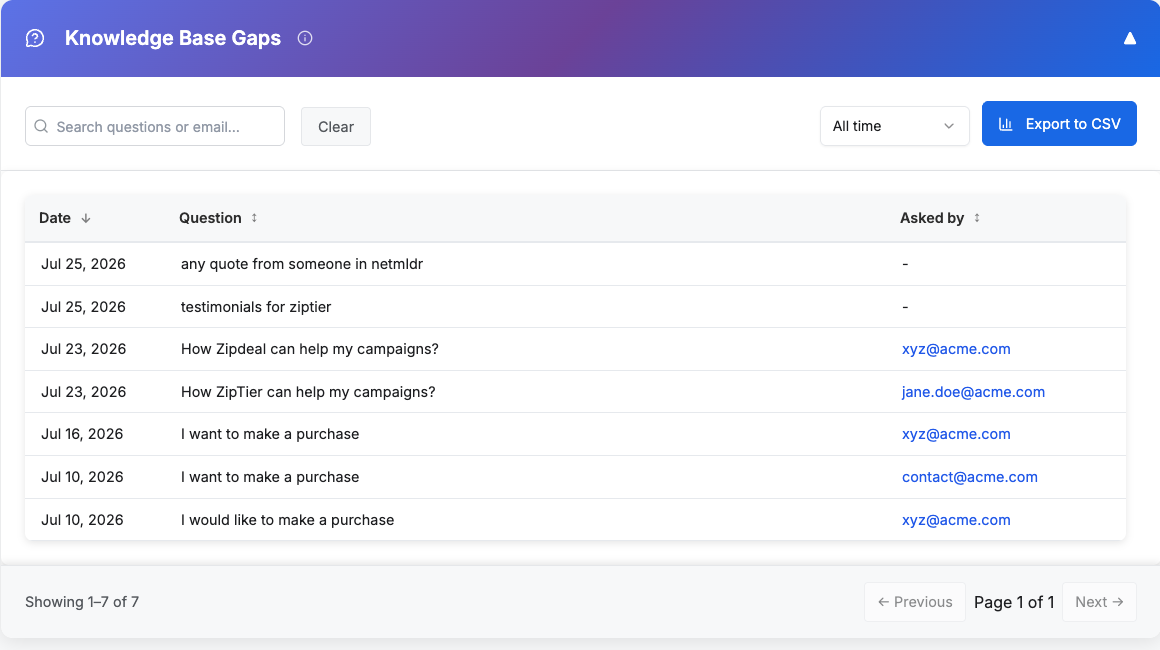
The Knowledge Base Gaps panel surfaces visitor questions that your AI Assistant was unable to fully answer. It gives you a running list of the exact content your knowledge base is missing, so you can add or refine documents and make sure similar questions get accurate answers going forward.
How it works
Every conversation is analyzed after the fact by an LLM. When the analyzer detects that a response was incomplete, evasive, or explicitly acknowledged that the assistant did not have the necessary information, the visitor's original question is flagged and added to this panel. Each flagged question appears with the date it was asked and the email of the visitor (when available; anonymous visitors show a dash instead).
Below is the Knowledge Base Gaps table, showing flagged questions with their date and the visitor who asked them.
What you can do
- Search: Use the search box to find specific questions or filter by a visitor's email.
- Filter by date: Pick a range from the date dropdown (All time, Last 24 hours, Last 7 days, Last 14 days, or Last 30 days) to narrow the list to recent gaps.
- Sort: Sort the table by Date or by Asked by to review the most recent gaps first or group by visitor.
- Show more: Long questions are truncated in the table view. Click Show more to expand and read the full question.
- Export to CSV: Download the full filtered list to review with your content or product marketing team.
Turning gaps into content
Once you have reviewed the flagged questions, the typical workflow is:
- Group similar questions to identify recurring themes (e.g., pricing, integrations, technical specifications, competitor comparisons).
- Add or update knowledge base content: upload new documents, refresh existing PDFs, or add website URLs that answer these questions.
- Re-test in the sandbox to confirm the assistant now handles the question correctly.
- Monitor the panel in subsequent weeks and confirm the gap no longer surfaces in new conversations.
Not every flagged question is a real gap. The analyzer catches responses that did not fully answer the question, but it cannot always tell whether the question was actually off-topic (for example, a visitor asking about the weather on a firewall product page, or venting personal thoughts unrelated to your product). Review the list with judgment: questions clearly related to your product are the ones worth addressing, while off-topic or unrelated questions can safely be ignored. No action is required on those.
Tip: Review Knowledge Base Gaps weekly during the first month of a new campaign, since that is when the biggest content gaps surface. Fixing them early has a compounding effect on lead quality and reduces the number of visitors who bounce because the assistant could not answer their question.