High-Scoring Lead Capture
High-Scoring Lead Capture is ZipTier's lead detection system. It spots buying signals during AI assistant conversations, asks for contact details at the right moment (without the friction of an upfront email form) and then scores the lead on Fit and Intent so only your best leads reach your inbox and your CRM.
Instead of requiring visitors to provide their email before starting a conversation, ZipTier monitors the conversation for buying signals and only asks for contact details when the visitor is showing genuine purchase intent. This results in higher-quality leads and a better visitor experience.
How It Works
High-Scoring Lead Capture works in five stages:
- Conversation Monitoring
As a visitor chats with your AI assistant, ZipTier analyzes the conversation in real time for purchase intent signals.
- Intent Detection
When the system detects strong buying signals, it identifies the visitor as a high-intent prospect and triggers a contextual prompt for the primary contact (email or phone) within the conversation.
- Contact Capture
The AI assistant naturally asks the visitor for their primary contact (email or phone) at a relevant point in the conversation, not as a gate, but as a helpful follow-up offer. This non-intrusive approach leads to significantly higher capture rates.
- Lead Scoring
The captured lead is scored on two groups, Fit (how well they match your ideal customer) and Intent (how strongly they are signalling a need), and assigned a tier of High, Medium or Low. You define what those tiers mean per campaign. See Lead Scoring.
- Lead Delivery
Only leads in the High tier are delivered. ZipTier waits approximately 5 minutes so the score reflects the whole conversation, re-checks the tier, and then sends the email alert and, if configured, pushes the lead to your HubSpot CRM.
Intent Signal Detection
ZipTier evaluates purchase intent by looking for five specific signals during conversations. The system applies strict standards: it only flags a signal when there is clear, explicit evidence in the visitor's words, not from polite interest or curiosity alone.
| Signal | What It Detects | Triggers When |
|---|---|---|
| Purchase | Clear buying intent or requests for next-step commercial actions | Visitor asks to get started, requests a contract, or indicates readiness to move forward. Pricing questions or feature comparisons alone do not trigger this signal. |
| Timing | Concrete timeframes, deadlines, or urgency to implement | Visitor references a specific rollout window, evaluation period, or deadline (e.g., "We need this before our event next month"). Vague interest like "maybe later" does not qualify. |
| Authority | Explicit decision-making power or approval responsibility | Visitor states they make, influence, or approve purchasing decisions. Simply mentioning their job title or department is not enough. |
| Need | Specific pain points, business problems, or gaps with current solutions | Visitor describes a concrete problem they are facing (e.g., "Our bounce rate is too high", "We lose leads after webinars"). General product questions or feature inquiries do not qualify. |
| Budget | Budget references, spend limits, or financial approval constraints | Visitor mentions an actual budget amount, affordability concern, or need for financial approval. Pricing questions by themselves do not trigger this signal. |
When multiple signals are detected in a single conversation, the confidence level increases and the system is more likely to trigger the email capture prompt. The detection is deliberately conservative: it filters out casual browsers and curiosity-driven questions to ensure you only receive alerts for genuinely purchase-ready prospects.
Why Quick Follow-Up Matters
Research consistently shows that the speed of follow-up is one of the strongest predictors of converting a lead into a customer. Prospects who are actively researching solutions and showing purchase intent have a narrow window of engagement: the longer you wait, the more likely they are to move on to a competitor or lose momentum.
ZipTier is designed to help you act fast. From the moment a lead is scored High during a conversation, the system delivers a lead alert to your inbox within approximately 5 minutes. If you've connected HubSpot, the lead is simultaneously pushed to your CRM so your sales team can begin follow-up immediately: no manual data entry, no delays.
Lead Alert Emails
When a lead is scored High, ZipTier sends an email alert to your alert recipients (up to 5, set in Settings > Email Alerts) within approximately 5 minutes. The email includes:
- A summary of the conversation and key topics discussed
- The detected intent signals (Purchase, Timing, Authority, Need, Budget)
- The campaign and AI assistant that captured the lead
- A direct link to view the prospect's contact details in the High-Scoring Leads page
Viewing Captured Leads
All delivered high-scoring leads are available in the High-Scoring Leads page. From the lead alert email, click the link to go directly to the prospect's details, where you can:
- View a summary of the conversation and key topics discussed
- See the detected intent signals
- Review the prospect's contact information
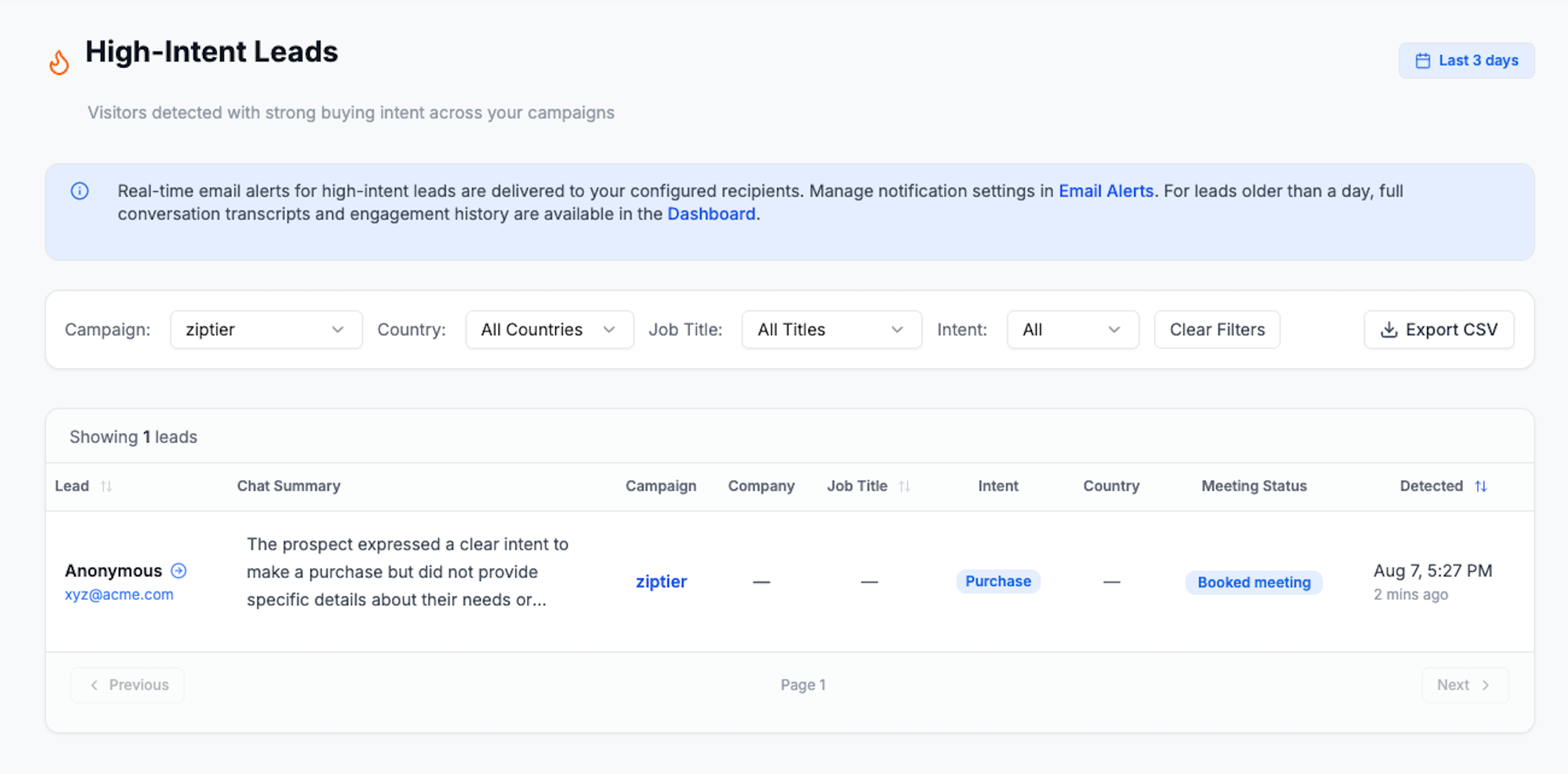
Below is the High-Scoring Leads page, showing the filters and the table of captured leads with their chat summary, campaign, intent, and meeting status.
HubSpot CRM Integration
You can connect your HubSpot CRM to automatically push high-scoring leads as contacts. This eliminates manual data entry and ensures your sales team can follow up immediately from within HubSpot.
For a complete guide on connecting HubSpot, configuring field mappings, testing the integration, and monitoring sync activity, see the HubSpot CRM Integration documentation.
Best Practices
- Don't ask for email upfront: Let the AI assistant build rapport first. High-Scoring Lead Capture works best when visitors feel comfortable sharing information naturally.
- Review leads promptly: High-scoring leads have a short window of opportunity. Aim to follow up within 1 hour of receiving the alert.
- Connect your CRM: Connect HubSpot to eliminate manual data entry and enable your sales team to act immediately. See the HubSpot CRM Integration guide.
- Customize your AI assistant: A well-configured assistant with relevant content produces more meaningful conversations, leading to higher-quality intent signals.
- Upload comprehensive content: The more detailed your knowledge base, the deeper conversations visitors will have, increasing the chance of surfacing purchase intent signals.
Frequently Asked Questions
Why wait before sending the alert?
The short delay allows the conversation to reach a natural conclusion. This means the conversation summary in the alert captures the full context, and the lead is scored on everything the visitor said rather than half of it, which is also why the tier is re-checked at the end of the wait.
What happens if the visitor doesn't provide their primary contact?
If the visitor declines to share their primary contact, the conversation continues normally. The interaction is still recorded in your campaign analytics, but no lead alert is triggered since there's no contact information to follow up on.
Can I adjust the intent detection sensitivity?
The intent detection system is pre-tuned for optimal performance. It uses strict qualification standards and requires clear, explicit evidence of purchase intent, not just curiosity or polite interest. Intent is then combined with Fit to produce the lead's tier, and only High-tier leads generate an alert, so what reaches your inbox is tuned by your Lead Scoring configuration as well.
Does this replace the upfront email collection form?
You can use both approaches. Some campaigns may benefit from collecting email upfront (e.g., gated content), while others work better with the High-Scoring Lead Capture approach (e.g., product exploration, pricing inquiries). You configure this per campaign in the campaign setup wizard.