Leads
The Leads section provides detailed insight into individual prospects who interacted with your AI Assistant. It goes beyond raw conversation logs by surfacing a clear summary of each user's engagement, their level of intent, and the actions they took. This makes it easy for marketers and sales teams to quickly identify high value leads and plan effective follow-ups.
Below is the Leads table, showing lead score, chat summary, signals, and CTA filters and columns.
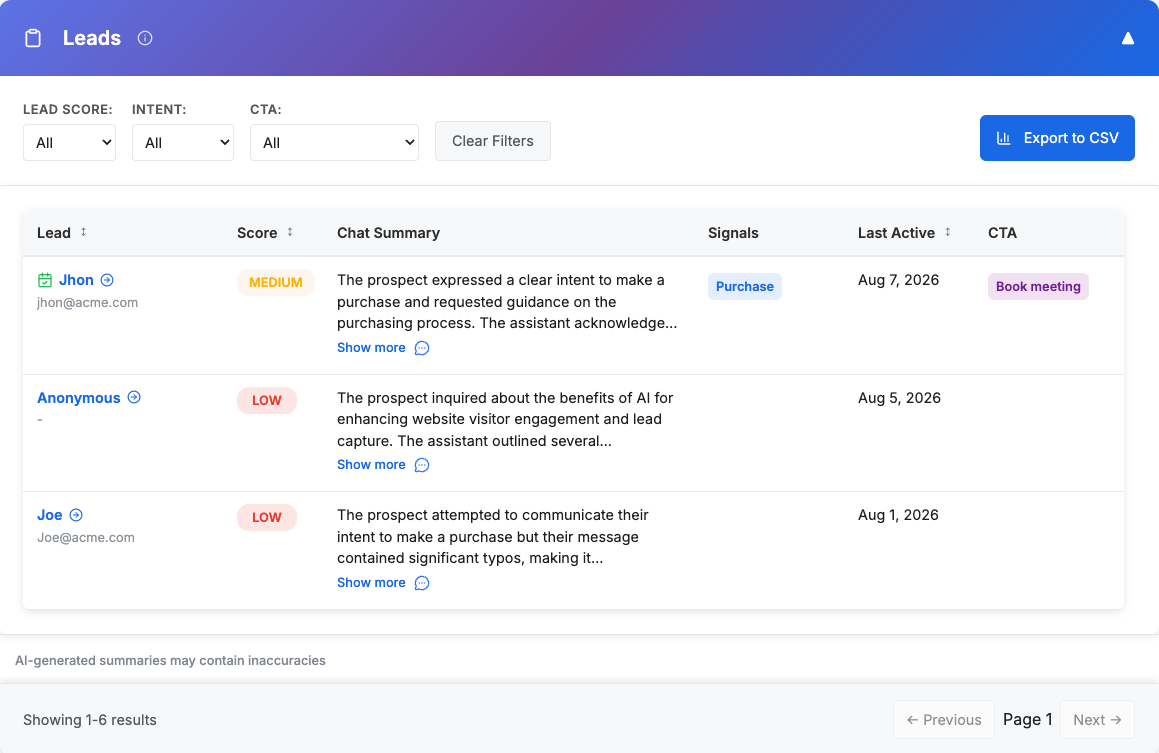
Table Features
- Columns
- Lead: Lead's name, with their primary contact (email or phone, as set in the campaign's lead settings) underneath. When no name was given, the primary contact is shown instead. Click it to open the Lead Details sidecar.
- Chat Summary: An AI generated summary of the user conversation, with a icon to access the full transcript.
- Score: Automatic assignment of the prospect into High, Medium, or Low based on your campaign's Lead Scoring configuration.
- Last Active: Date of the lead's most recent chat message.
- Signals: Key intent signals inferred from the conversation.
- CTA: Calls-to-action are recorded based on the actual links or buttons the user clicked (e.g., Demo, Contact, Learn more).
- Additional user data captured: These columns (Job Title, Company, Employees Size, Email or Phone, Country) are displayed only if you configured your campaign to collect them from the user in Lead Settings. On phone-first campaigns the Email column is always shown, since the chat can still capture an email.
- Sorting
Click a sortable column header (e.g., Lead, Score, Last Active, Job Title) to reorder the table. Chat Summary, Signals, and CTA are not sortable. - Filtering
Use the dropdowns at the top to filter by:- Lead Score (High/Medium/Low)
- Intents (Purchase, Need, Budget, Authority, Timing)
- CTAs (e.g., Demo, Contact, View resources)
Instantly reset all filters to see the full lead list again.
- Export to CSV
- Download the visible table data in CSV format.
- Includes headers: Name, Email, Chat Summary, Lead Score, Last Active, Intent, CTAs (plus Job Title, Company, Employees Size, Phone, or Country if those fields are enabled for the campaign).
- Useful for CRM imports or offline analysis.
Tip: Use filtering to segment leads by intent (e.g., “Purchase”) and share those directly with sales teams.
Chat Summary
For every prospect, ZipTier automatically records a full transcript of their interaction with your AI Assistant. To make this information easier to digest, the system uses AI to generate a concise summary that highlights the prospect's key questions, areas of interest, and overall engagement. This means you don't have to sift through long conversations to understand key aspects of what was discussed; the summary surfaces the critical details at a glance.
- What you see: A short description of the conversation in the Leads table.
- Full detail: Click the icon to open the complete transcript with timestamps, user details, and all messages exchanged.
- Why it matters: Summaries help marketing and sales teams quickly identify high-scoring leads, understand prospect needs, and prepare more effective follow-ups.
Intents
The Intents feature helps you understand the motivations behind a prospect's conversation with your AI Assistant. By analyzing chat transcripts, ZipTier automatically tags each lead with one or more intent categories. These insights allow marketers and sales teams to gauge where the prospect is in their buying journey and prioritize follow-ups accordingly.
Intent Categories
- Need – The user has a specific need or problem they are trying to resolve
- Purchase – Beyond the need, the user is actively looking to purchase or implement a solution, asking to get started or signalling readiness to move forward. Pricing questions alone don't qualify.
- Budget – The user shares budget constraints or a price range they have in mind.
- Authority – The user indicates their role in the decision-making process (e.g., “I am looking to buy for my team”).
- Timing – The user mentions a timeframe for purchase or implementation.
Lead Score
The Lead Score gives you a quick way to understand how qualified a prospect is based on their interaction with your AI Assistant. Each lead is graded High, Medium, or Low from two weighted groups: Fit (how well the lead's collected details match your ideal customer) and Intent (the intent level detected in the conversation).
By default, every campaign scores on Intent alone (Intent 100 / Fit 0), with Medium starting at 40 and High starting at 70. You can add Fit rules, change the weights, cutoffs, and guardrails per campaign. See Lead Scoring for how scores are calculated and configured.
A High score suggests a prospect is ready for immediate follow-up. A Medium score suggests moderate interest, where nurturing may be required. A Low score reflects weak fit or buying signals.
By surfacing lead scores alongside chat summaries and intents, ZipTier helps marketing and sales teams prioritize follow-ups, focus on the most promising leads, and optimize resource allocation.
Why It Matters: The Leads section helps you quickly identify high-scoring prospects, understand what each user cares about most, see exactly which actions they took, and export or share lead data seamlessly with your sales team. By combining summaries, intents, and CTAs, ZipTier makes it easy to prioritize follow-ups and move prospects further down the funnel.