Buy Conversations
If your AI Conversation usage spikes for a particular month (a busy webinar week, a major launch, an unexpected campaign surge), you can buy extra conversation credits to top up your conversation balance instead of upgrading your plan. These are additional AI Conversations you purchase on top of your plan's monthly allocation. To buy extra conversations, navigate to Settings > Subscription > Buy Conversations.
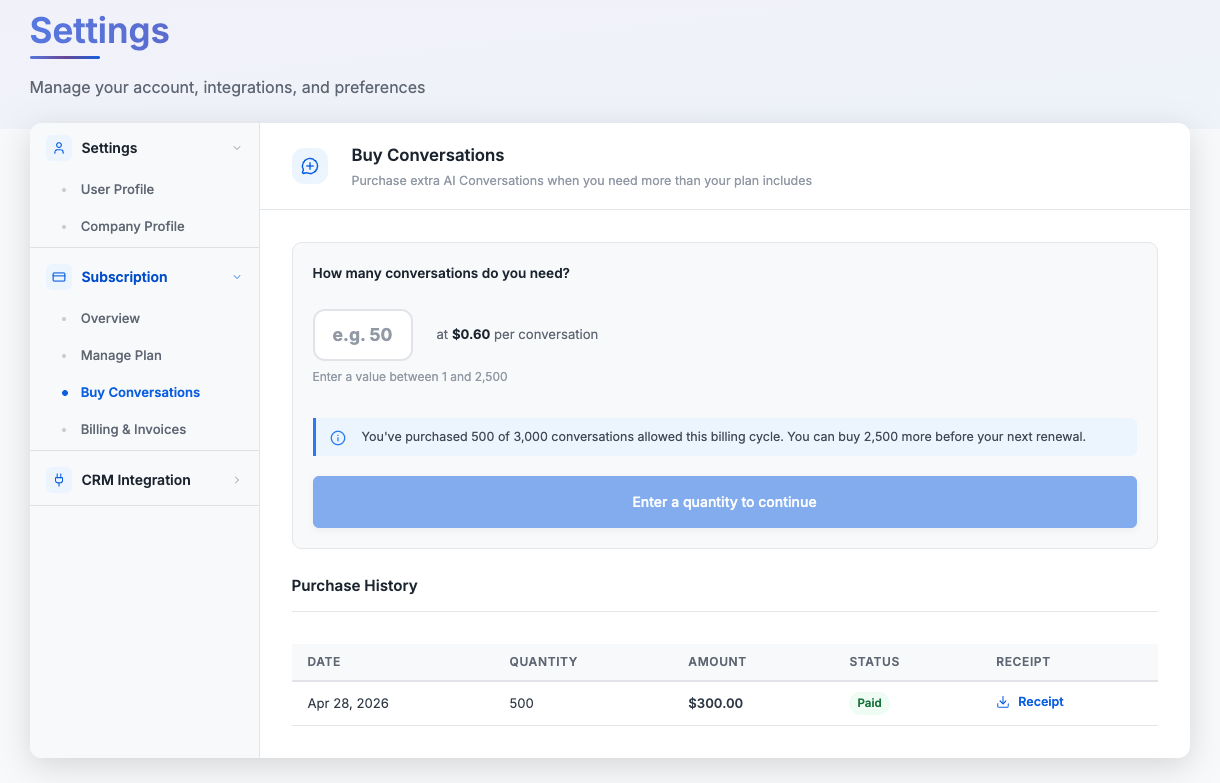
Below is the Buy Conversations page on a Pro plan, showing the quantity input, per-conversation price, remaining purchase cap, and purchase history.
Who Can Buy Extra Conversations
- Buying extra conversations is available on the Starter, Pro, and Premium plans only. It is not available on the Free plan.
- If you're on the Free plan and open the Buy Conversations page, you'll see an upgrade prompt with a link to Manage Plan: you'll need to upgrade to a paid plan first before you can purchase extra conversations.
- Extra conversation purchases apply to Live AI Conversations only. Sandbox conversations are not eligible. If you need more sandbox conversations, upgrade to a higher plan.
Pricing & Limits
Each plan has its own per-conversation price and a cap on how many extra conversations you can buy in a billing cycle. The cap is set to roughly the difference between your current plan's included credits and the next tier's allocation, so heavy users have a clear signal that upgrading would be more economical.
| Plan | Included Credits | Price (per credit) | Max per Cycle | Max Spend |
|---|---|---|---|---|
| Starter | 250 | $0.65 | 1,000 | $650.00 |
| Pro | 1,250 | $0.60 | 3,750 | $2,250.00 |
| Premium | 5,000 | $0.55 | 5,000 | $2,750.00 |
Why buying extra conversations is priced higher than the plan rate: The per-conversation cost of an extra conversation credit is intentionally higher than the effective per-conversation cost of upgrading to the next tier. This means that if you're consistently running over your monthly allocation, upgrading is the cheaper long-term option. Buying extra conversations is designed for occasional spikes, not as a permanent substitute for the right plan.
The Buy Conversations page tracks how many extra conversations you've already purchased in the current billing cycle and shows you the remaining cap. Once you reach the cap, you'll need to upgrade to the next plan to buy more.
How Conversation Credits Work
Expiry
Purchased conversation credits expire 90 days after the purchase date. This is independent of your billing cycle: a conversation credit purchased on the 1st of the month is valid until 90 days from that purchase, even if your plan renews and resets in between.
Deduction Order
When a visitor consumes an AI Conversation credit, ZipTier always deducts from the fastest-expiring credit lot first. This applies across both your monthly subscription credits and any extra conversation credits you've purchased.
- Subscription credits typically expire at the end of the billing cycle, so in most cases they're consumed before extra conversation credits.
- However, if you purchased extra conversation credits earlier in the cycle and they're closer to their 90-day expiry than your subscription credits' cycle end, those purchased credits will be drawn first.
- The goal is to minimize wasted credits: you'll never lose a purchased conversation credit just because the system picked a "newer" lot first.
How to Buy Conversations
- Navigate to Settings > Subscription > Buy Conversations in your dashboard.
- Enter the number of conversations you want to buy in the quantity input. The allowed range is shown below the input (for example, "Enter a value between 1 and 2,500") and reflects the remaining cap for your current billing cycle, factoring in any extra conversations you've already purchased this cycle.
- Once you enter a quantity, an order summary appears showing the number of conversations, the per-conversation price, the validity period (90 days from purchase), and the total cost.
Below is the order summary that appears after entering a quantity, showing 800 conversations and the Buy 800 Conversations button.
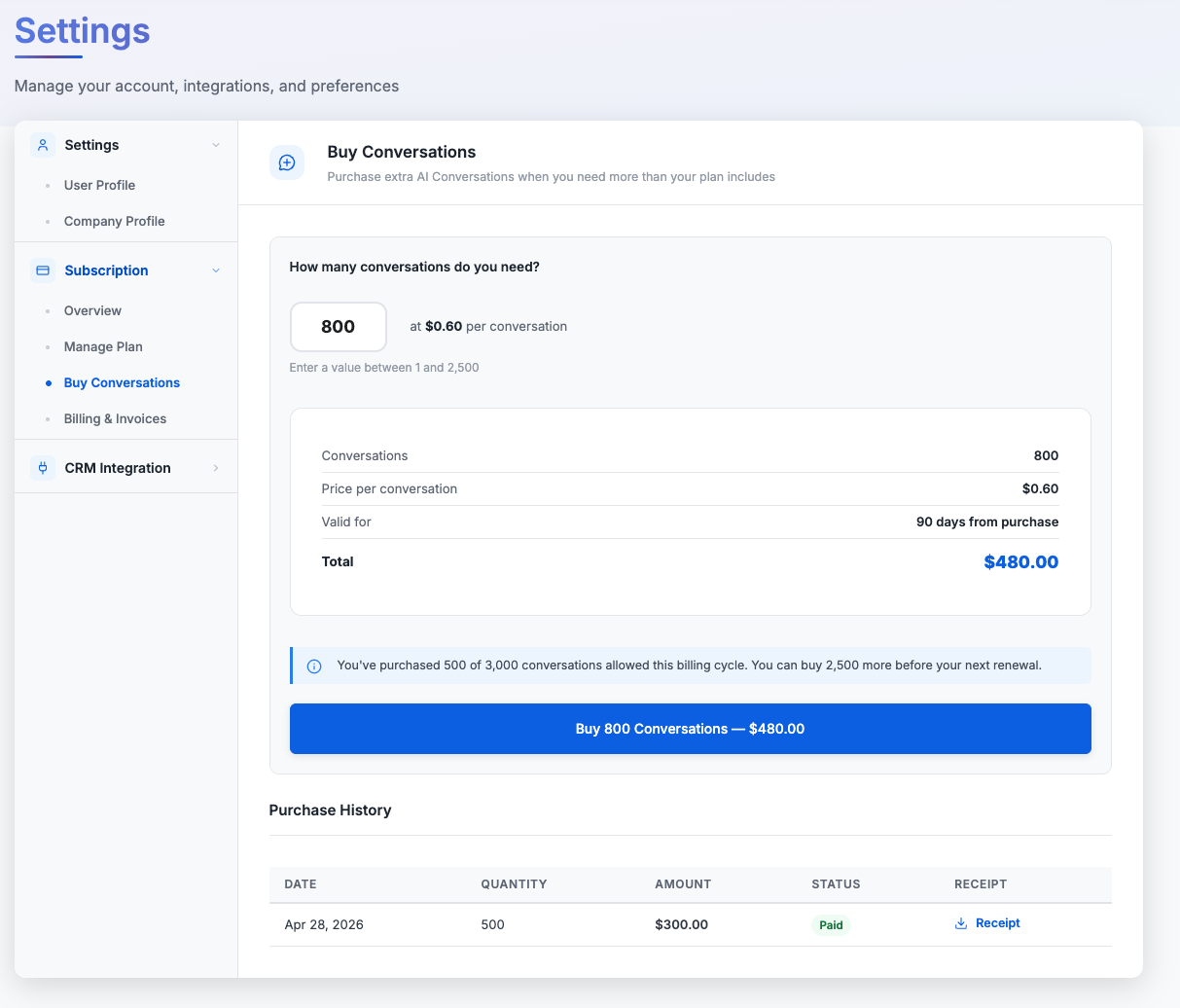
- Click the Buy N Conversations: $X.XX button. You'll be taken to a secure Stripe-hosted checkout page to select or enter a payment method, then confirm the charge.
- Once payment succeeds, the conversation credits are added to your account immediately and the purchase appears in the Purchase History table at the bottom of the Buy Conversations page, where you can also download a PDF receipt.
Use a different payment method if you want. The Stripe checkout for extra conversation purchases is independent of your subscription's payment method. You can pay for extra conversations on a different card or payment method without changing your subscription's billing setup.
Where to find your conversation purchases: Purchase receipts and history live on the Buy Conversations page, not in Billing & Invoices. Billing & Invoices only shows your recurring plan charges.
Upgrade & Downgrade Behavior
When You Upgrade
- Your conversation purchase cap resets to the new (higher) plan's limit immediately. Extra conversations you bought on the previous plan don't count against the new plan's cap.
- Any unused conversation credits you'd already purchased remain valid: they continue to work until their individual 90-day expiry, alongside your new plan's monthly credits.
When You Downgrade
- Downgrades take effect at the end of your current billing cycle. Until then, you can continue to buy extra conversations up to your current plan's cap.
- Once the downgrade kicks in at the start of the next cycle, your conversation purchase cap drops to the lower plan's limit going forward.
- Existing unused conversation credits are not clawed back. They stay valid until their 90-day expiry regardless of plan changes.
Extra Conversations vs. Upgrading
Buying extra conversations is the right choice for occasional spikes: a one-off webinar push, a launch week, or a seasonal campaign that briefly takes you over your monthly allocation. For sustained higher usage, upgrading to the next plan tier is almost always cheaper per conversation. A few rules of thumb:
- If you're hitting your monthly cap two or more cycles in a row, evaluate the next plan. The included-credit cost of the higher tier is significantly lower than the per-credit rate of buying extra conversations at your current tier.
- On the Premium plan, there is no higher tier to upgrade to; buying extra conversations is the way to handle unexpected demand. If your needs consistently exceed Premium plus its conversation purchase cap, contact our sales team for a custom volume package.