Analytics Settings
Control what the AI Assistant widget collects across your site. Find it at Settings > Analytics.
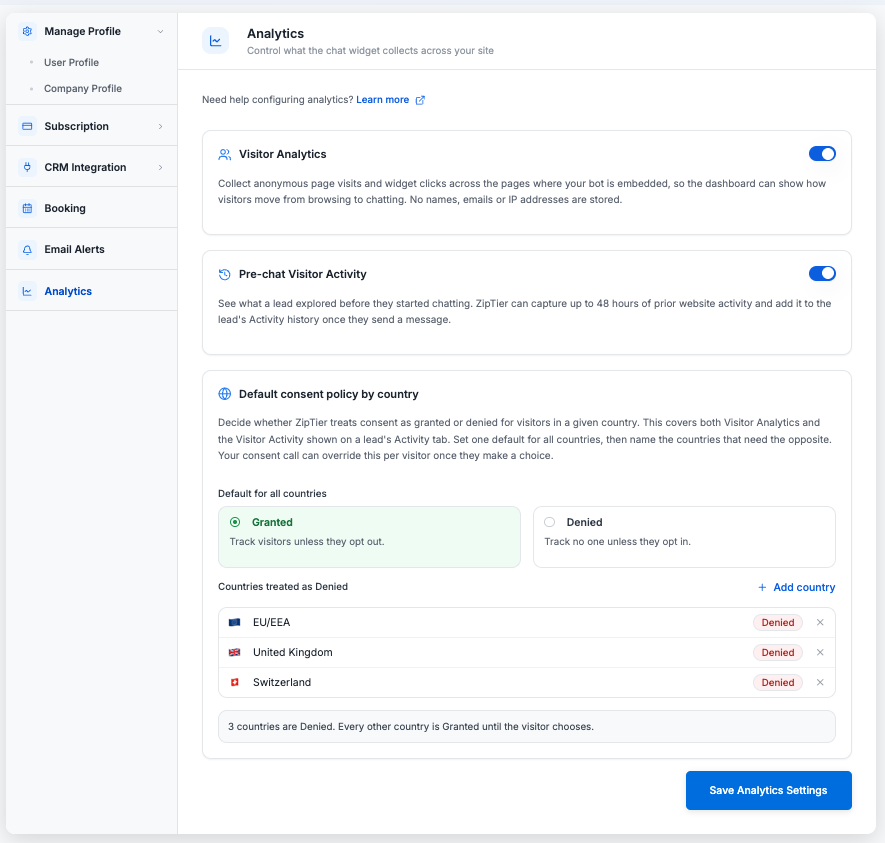
Below, Visitor Analytics and Pre-chat Visitor Activity are both on, the default for all countries is Granted, and the EU/EEA, United Kingdom and Switzerland are listed as exceptions that default to Denied.
Visitor Analytics
When enabled, ZipTier collects anonymous page visits and widget clicks across the pages where your AI Assistant is embedded, so your dashboard can show how visitors move from browsing to chatting. No names, emails, or IP addresses are stored.
Turning this off stops new visits from being recorded, even for visitors who have given consent; existing data stays visible until it ages out.
Pre-chat Visitor Activity
When enabled, ZipTier keeps a short record of the pages a visitor browses before they start chatting, in the visitor's own browser, so a lead's Activity tab can show what they looked at beforehand. Nothing is sent to ZipTier until the visitor sends a message, and records older than 48 hours are dropped.
Turning this off stops that earlier browsing from being recorded, even for visitors who have given consent. Once a visitor sends a message, their activity is still tracked from that point on, whatever this setting or the country policy below says.
Default Consent Policy by Country
Some visitors leave the page before your cookie banner (or their consent management platform) reports a choice. This setting controls what tracking assumes for them in the meantime. It applies to both Visitor Analytics and Pre-chat Visitor Activity above, each only while it is turned on. A real consent choice, whenever it arrives, always overrides this default.
Set one default for all countries: Granted (track visitors unless they opt out) or Denied (track no one unless they opt in), then list any countries that need the opposite treatment.
Countries Treated as the Opposite Default
Click + Add country to search for a country or pick from a shortlist of common ones, including EU/EEA, which adds all member countries in one click. Every listed country gets the opposite of the default you chose above; every other country keeps that default until the visitor makes a real choice.
List at least one country. With none listed, nothing is saved and every country is treated as Granted, whichever default is selected.
Note: These defaults only apply for the window before a visitor's actual consent choice is known. See Cookie Consent for how to report a visitor's real choice to ZipTier via window.ziptierConsent.